SCIM provisioning
Provision users and groups into a SenseCrypt tenant from your identity provider over SCIM 2.0 — the base URL, a bearer token, Users and Groups, filtering, and error handling.
This guide connects your identity provider (Okta, Entra ID, Ping, and others) to a SenseCrypt tenant so users and groups are provisioned automatically over SCIM 2.0. Your directory stays the source of truth. For the model, see SCIM.
Prerequisites
- A SenseCrypt tenant.
- Permission in the admin console to mint a SCIM token (or an M2M app with SCIM capabilities).
1. Get the base URL
The SCIM base URL is on the tenant's issuer host:
{issuer}/v1/idp/scim/v2Your IdP's SCIM connector will append /Users, /Groups, etc. All request and response bodies use the SCIM content type application/scim+json.
2. Mint a bearer token
In the admin console, open the SCIM Tokens page and click New SCIM token.
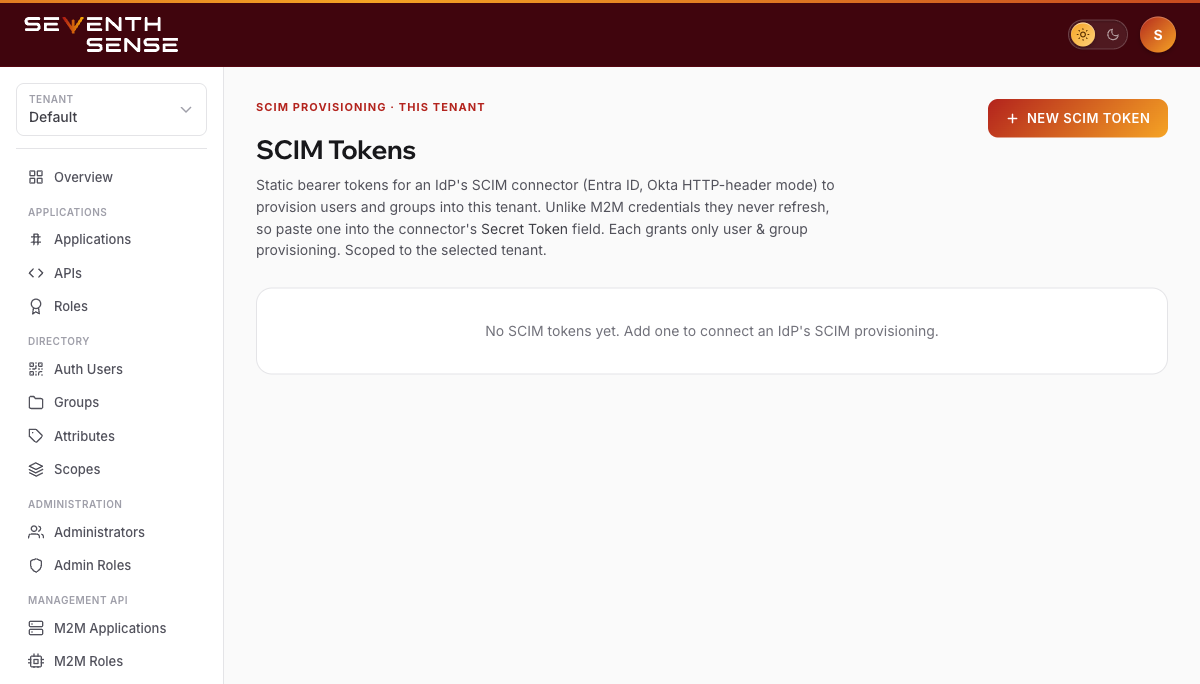
The SCIM Tokens page — its empty state and the New SCIM token button.
Give the token a label and, optionally, an expiry.
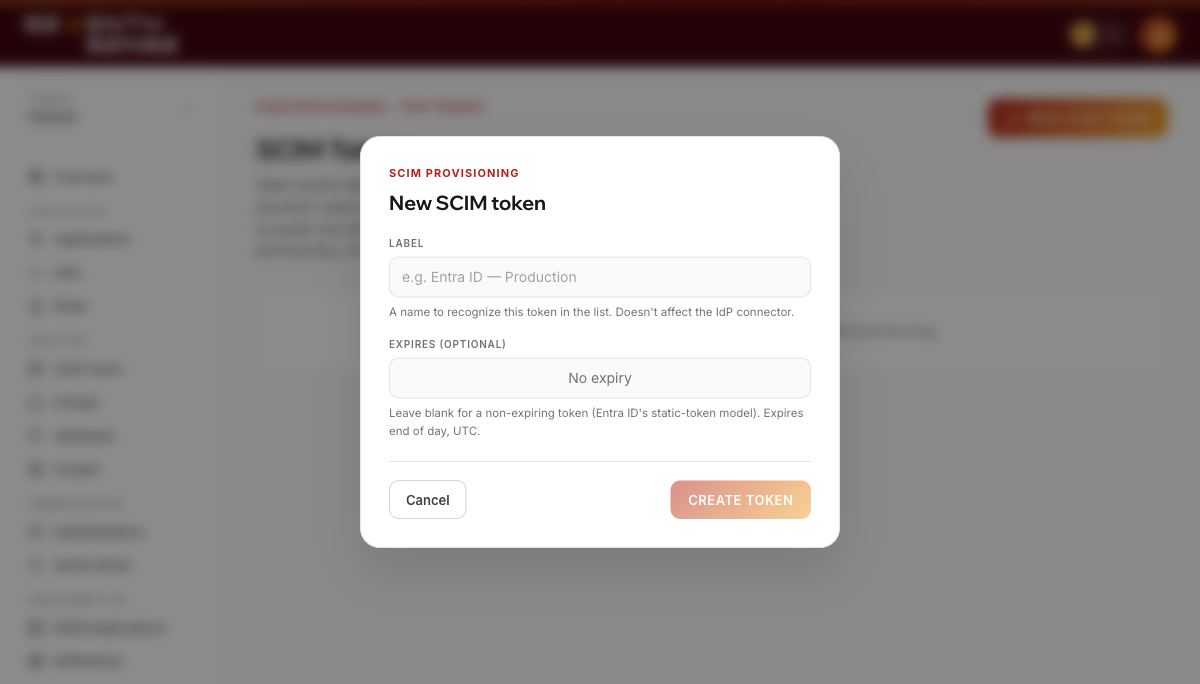
The New SCIM token modal: a label and an optional expiry.
The token secret is shown once, on creation — copy it immediately and store it in your IdP's connector. The token:
- is prefixed
ssct_, - is scoped to this tenant only, and
- can be revoked at any time in the console.
Your IdP sends it as Authorization: Bearer ssct_... on every SCIM request. (Alternatively, an M2M access token whose role grants the SCIM capabilities scim:read / scim:write also works.)
3. Confirm the connector against discovery
The ServiceProviderConfig tells your connector exactly what's supported (this endpoint needs no auth):
curl {issuer}/v1/idp/scim/v2/ServiceProviderConfig{
"schemas": ["urn:ietf:params:scim:schemas:core:2.0:ServiceProviderConfig"],
"patch": { "supported": true },
"bulk": { "supported": true, "maxOperations": 1000, "maxPayloadSize": 1048576 },
"filter": { "supported": true, "maxResults": 200 },
"changePassword": { "supported": false },
"sort": { "supported": true },
"etag": { "supported": true },
"authenticationSchemes": [
{ "type": "oauthbearertoken", "name": "OAuth Bearer Token" }
]
}changePassword is false by design — SenseCrypt is passwordless. Note the filter.maxResults (200) and bulk.maxOperations (1000) ceilings.
4. Configure your IdP connector
Point your IdP's SCIM app at the base URL and paste the bearer token, then map your IdP's user attributes to SCIM fields. SenseCrypt supports:
- Users — create, read, update (PUT/PATCH), deactivate, delete;
userNameand a primary email are required on create. - Groups — create, update, membership changes, and push group membership.
- Bulk, filtering, sorting, and ETags — as advertised in the service provider config above.
Create a user
curl -X POST {issuer}/v1/idp/scim/v2/Users \
  -H "Authorization: Bearer ssct_..." \
  -H "Content-Type: application/scim+json" \
  -d '{
    "schemas": ["urn:ietf:params:scim:schemas:core:2.0:User"],
    "userName": "jane@acme.com",
    "name": { "givenName": "Jane", "familyName": "Doe" },
    "emails": [{ "value": "jane@acme.com", "primary": true, "type": "work" }],
    "active": true
  }'
Response 201 Created:
{
  "schemas": ["urn:ietf:params:scim:schemas:core:2.0:User"],
  "id": "8f2c…",
  "userName": "jane@acme.com",
  "emails": [{ "value": "jane@acme.com", "primary": true, "type": "work" }],
  "active": true,
  "meta": { "resourceType": "User", "created": "…", "lastModified": "…" }
}
The enterprise extension (urn:ietf:params:scim:schemas:extension:enterprise:2.0:User) is supported for employeeNumber, costCenter, organization, division, and department — these are stored on the user and echoed back in the SCIM User response. The manager sub-attribute is accepted but not currently mapped.
5. Understand enrollment (pending shells)
SCIM-provisioned users are created as pending shells — they have a profile and group memberships, but no biometric yet, so they cannot sign in until enrolled. The user binds their face on first use of the Authenticator app, which claims the shell in place and keeps the SCIM-owned identity and groups.
This is expected: your IdP owns the account lifecycle, and the user adds the biometric themselves.
6. Deactivation and deletion
- Setting a user
active: false(via PATCH or PUT) is a reversible suspend that immediately revokes their device keys and refresh tokens. Re-activating does not restore the biometric — the device must re-enroll. - Deleting a user (
DELETE /Users/{id}→204) is permanent, with the same revocation.
Filtering (reference)
SenseCrypt implements the full SCIM user filter grammar — operators eq ne co sw ew gt ge lt le pr, and/or/not, grouping, and emails[...] value paths. For example:
GET {issuer}/v1/idp/scim/v2/Users?filter=userName eq "jane@acme.com"Resolvable user paths include userName, externalId, emails (incl. emails.value and emails[type eq "work"].value), and active. Group filtering supports displayName eq "..." (plus externalId, id, meta.created, meta.lastModified).
An unknown attribute path or a malformed filter returns 400 invalidFilter — it never silently returns the whole directory. Very large result sets are paginated; a single page returns at most 200 (filter.maxResults). You may also POST a filter to /Users/.search or /Groups/.search.
Error handling
Errors use the standard SCIM error envelope:
{
  "schemas": ["urn:ietf:params:scim:api:messages:2.0:Error"],
  "status": "409",
  "scimType": "uniqueness",
  "detail": "a user with that userName already exists"
}
The scimType values you may observe:
scimType | When |
|---|---|
uniqueness | A duplicate email or userName (HTTP 409). |
invalidFilter | Unknown filter path or malformed filter expression (HTTP 400). |
invalidValue | A bad value — e.g. a target-less group remove (which is rejected rather than clearing all members), or a bad date value. |
invalidPath | A bulk operation with an unsupported path or missing resource id. |
tooMany | A bulk request exceeding maxOperations (HTTP 413). |
Verify it worked
- In your IdP, assign a test user to the SenseCrypt SCIM app and let it push.
- Confirm creation:
GET {issuer}/v1/idp/scim/v2/Users?filter=userName eq "test@acme.com"returns one resource with anid. - Assign the user to a group in your IdP and confirm the membership appears on the SCIM resource.
- Set the user inactive in your IdP and confirm
activeflips tofalseon the SCIM resource. The user is now suspended in SenseCrypt.
Notes
- SCIM-managed groups are read-only in the admin console so your IdP stays authoritative. They still participate in the access gate.
- Group member removal eagerly revokes the affected user's credentials (device keys and refresh-token families).
- PATCH operation names (
add/replace/remove) are case-insensitive, and unknown PATCH paths are ignored (forward-compatible with connectors that send extra fields).
Related
- SCIM — the protocol surface and resource details.
- Machine-to-machine — using an M2M token instead of an opaque SCIM token.
SAML SSO
Configure a SAML service provider against a SenseCrypt tenant — exchange metadata, register your ACS, choose a NameID format, map attributes, and test the flow.
Machine-to-machine
Get an access token for the SenseCrypt Management API with the OAuth 2.0 client-credentials grant — register an M2M app, bind roles, call the token endpoint, and use the token.