Generate your first Face Certificate
Getting started with functional eID
Now that you are familiar with generating foundational eID SensePrints, it is time to learn how to allow verification of foundational eID holders using their face without having their face.
The /generate-face-certificate endpoint issues an X.509 Face Certificate binding a face-derived public key to a user identity and purpose. The certificate is signed by the server's pki_private_key (your root CA key) and can be verified using the root certificate from /root-certificate.
What's new in v4.0.0: Face Certificates now support post-quantum safe key types via ML-DSA (signing) and ML-KEM (key encapsulation), in addition to the classic Secp256k1. The key_type field in the request selects the subject public key algorithm.
Prerequisites for Face Certificate Generation
To generate a Face Certificate, you must have:
- SensePrint - You cannot generate a certificate for a particular pupose without having the foundational eID - i.e. the SensePrint
- User's Face - Any key generation operation using a SensePrint is impossible without the user's face.
- Purpose ID - A Face Certificate contains a public key derived from a user's face as pertaining to a specific purpose. As an example, the purpose ID could simply be a unique identifier associated to a particular verifier - i.e. the verifier's ID / web site etc.
- key type - specifies the key algorithm for the certificate's subject public key.
- eID attributes subset (optional) - A Face Certificate can also contain a subset of attributes from the foundational eID as requested by a particular verifier. When included, these are typically encrypted using a specified public key so that only an authorized verifier can read them. The attributes are included as a JSON string. If the SensePrint doesn't contain any of the requested attributes, they are ignored.
- Public Key (optional) - When included, the requested attributes JSON string is encrypted using this key.
- The server must be configured with a private key as detailed in the Configuration section.
Generating Secp256k1 Key Pairs (for eID attribute encryption) - optional
While most programming languages will provide libraries to generate key pairs, to get you started, you can use the the OpenSSL command line tool. To install OpenSSL:
- Windows - FireDaemon provides binary installers for your convenience.
- Linux - You can install OpenSSL on linux by using the following commands:
sudo apt update
sudo apt install openssl
Within OpenSSL installed, from the command line, you can first generate a keypair:
openssl ecparam -name secp256k1 -genkey -noout -out secp256k1-key.pemThe keypair is now stored in a file called secp256k1-key.pem.
To print the Base64 encoded public key that the API will accept:
openssl ec -in secp256k1-key.pem -pubout -conv_form compressed -outform DER | tail -c 33 | openssl base64Later, during certificate verification, you will also need the private key. You can get this from the same file using:
openssl ec -in secp256k1-key.pem -outform DER | tail -c +8 | head -c 32 | openssl base64Using the API end-point
As before, on the Swagger Docs page authorize using the API Key you setup earlier.
Expand the /generate-face-certificate section and then click the Try it out button as shown below:
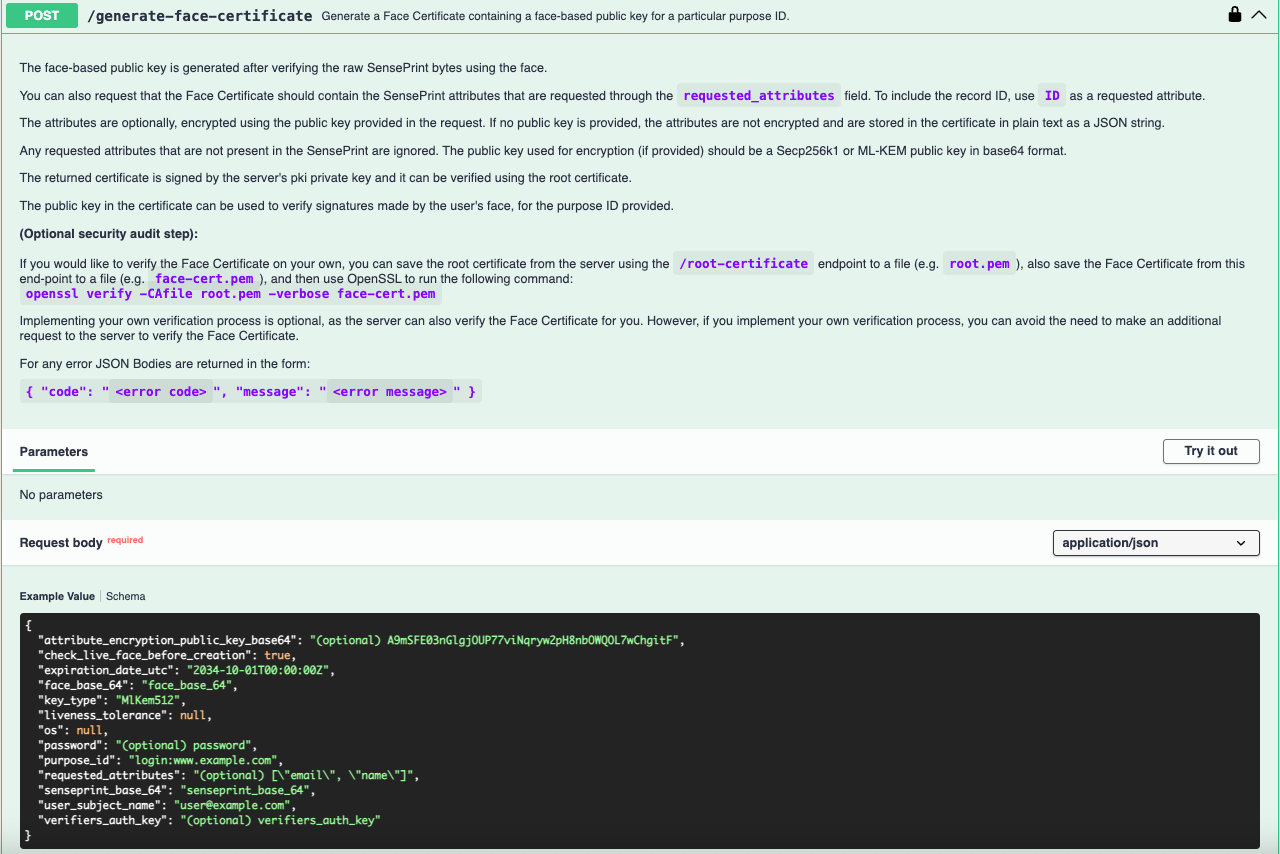
As before, after clicking the Try it out button, the following JSON text will become editable:
{
  "attribute_encryption_public_key_base64": "(optional) A9mSFE03nGlgjOUP77viNqryw2pH8nbOWQOL7wChgitF",
  "check_live_face_before_creation": true,
  "expiration_date_utc": "2034-10-01T00:00:00Z",
  "face_base_64": "face_base_64",
  "key_type": "MlKem512",
  "liveness_tolerance": null,
  "os": null,
  "password": "(optional) password",
  "purpose_id": "login:www.example.com",
  "requested_attributes": "(optional) [\"email\", \"name\"]",
  "senseprint_base_64": "senseprint_base_64",
  "user_subject_name": "user@example.com",
  "verifiers_auth_key": "(optional) verifiers_auth_key"
}
attribute_encryption_public_key_base64 specifies a base64 encoded public key on the Secp256k1 curve. When this key is specified, the server will encrypt the requested_attributes JSON string with this key.
check_live_face_before_creation will check if the face in face_base_64 is live (no spoofing detected) before creating a Face Certificate.
expiration_date_utc is a UTC time stamp of when the Face Ceritificate will expire.
face_base_64 is an image of the eID holder's face represented as a Base64 string. Most programming libraries will provide a way to convert a file to Base64, but for a quick demonstration, you can use this page to convert an image to a Base64 string.
key_type specifies the key algorithm for the certificate's subject public key.
liveness_tolerance is only used when check_live_face_before_creation is set to true and determines the strictness of the liveness algorithm.
os is also used only when check_live_face_before_creation is set to true and finetunes the liveness check. It indicates the operating system the image was captured on. Valid values are ANDROID / IOS / DESKTOP.
password should be specified when the senseprint_base_64 was generated with a password.
purpose_id specifies the purpose of the Face Certificate. It can also be simply a verifiers ID (UUID).
senseprint_base_64 is a base 64 encoded raw SensePrint from which a public key will be generated fo the specified purpose.
requested_attributes when specified, will include the SensePrint attributes in the Face Certificate. Only matched attribute names will be included. When a attribute_encryption_public_key_base64 is specified, the attributes JSON string will be encypted with the specified public key. Supports Secp256k1 (33/65 bytes) and ML-KEM-512/768/1024 (800/1184/1568 bytes). If a key is not specified, then the attributes will be included as plain-text JSON.
user_subject_name is the subject name of the use for whom the cerificate is being generated. If the certificate will be stored in a public registry, it is recommended that the subject name is pseudonymized or hashed.
verifiers_auth_key should be specified when a SensePrint was generated with it specified during generation as well.
key_type values - The key_type field controls the algorithm of the subject's public key embedded in the Face Certificate. Choose based on the intended use:
| key_type | Algorithm | Use case |
|---|---|---|
| Secp256k1 | ECDSA (secp256k1) | Face-based signing and encryption (classic) |
| MlDsa44 | ML-DSA-44 (NIST FIPS 204) | Post-quantum face-based signing |
| MlDsa65 | ML-DSA-65 (NIST FIPS 204) | Post-quantum face-based signing (higher security) |
| MlDsa87 | ML-DSA-87 (NIST FIPS 204) | Post-quantum face-based signing (highest security) |
| MlKem512 | ML-KEM-512 (NIST FIPS 203) | Post-quantum face-based key encapsulation / encryption |
| MlKem768 | ML-KEM-768 (NIST FIPS 203) | Post-quantum face-based key encapsulation (higher security) |
| MlKem1024 | ML-KEM-1024 (NIST FIPS 203) | Post-quantum face-based key encapsulation (highest security) |
Note: The key_type is the subject's key type — it is independent of the CA's signing algorithm. The certificate itself is always signed by the server's pki_private_key (which may be Secp256k1 or ML-DSA).
Understanding a certificate
If all goes well, you should see a response like the following:
{
  "cert_pem": "-----BEGIN CERTIFICATE-----\nMIIBkjCCATmgAwIBAgIQCo5zstpLm+yH4RyZ/zaLezAKBggqhkjOPQQDAjBIMUYw\nRAYDVQQDDD1TZW5zZUNyeXB0IEN1c3RvbWVyIElEIChjNGUzODk5MC1iNWFhLTRh\nOGItOGUyMi1jOTFkZGRjNWNlMGEpMB4XDTcwMDEwMTAwMDAwMFoXDTM0MTAwMTAw\nMDAwMFowGzEZMBcGA1UEAwwQdXNlckBleGFtcGxlLmNvbTBWMBAGByqGSM49AgEG\nBSuBBAAKA0IABB/L2yY5QIAYRROv9DszquN3r8MIOzaeuhGRPkaGRcZxaxR2koJN\n83QYQzbkSyq3Q03HT9SmpaL/P2weJ2HtG8+jNTAzMA4GA1UdDwEB/wQEAwIFoDAh\nBgoqhT4Ah3QBAQAABBN7Im5hbWUiOiJKb2huIERvZSJ9MAoGCCqGSM49BAMCA0cA\nMEQCIFnuHqVfiovbBeDEohGDzf9io8370cGEY3BljV/7owXfAiBOSTLC8uOLhgEb\n/d9GHkrand+z7MnviHjXHLCCtYL8MQ==\n-----END CERTIFICATE-----\n"
}
This is the JSON representation of your certificate (with line breaks represented as \n. You could use a language of your choice to save the string to a file. In this example, we use Python:
cert = "-----BEGIN CERTIFICATE-----\nMIIBkjCCATmgAwIBAgIQCo5zstpLm+yH4RyZ/zaLezAKBggqhkjOPQQDAjBIMUYw\nRAYDVQQDDD1TZW5zZUNyeXB0IEN1c3RvbWVyIElEIChjNGUzODk5MC1iNWFhLTRh\nOGItOGUyMi1jOTFkZGRjNWNlMGEpMB4XDTcwMDEwMTAwMDAwMFoXDTM0MTAwMTAw\nMDAwMFowGzEZMBcGA1UEAwwQdXNlckBleGFtcGxlLmNvbTBWMBAGByqGSM49AgEG\nBSuBBAAKA0IABB/L2yY5QIAYRROv9DszquN3r8MIOzaeuhGRPkaGRcZxaxR2koJN\n83QYQzbkSyq3Q03HT9SmpaL/P2weJ2HtG8+jNTAzMA4GA1UdDwEB/wQEAwIFoDAh\nBgoqhT4Ah3QBAQAABBN7Im5hbWUiOiJKb2huIERvZSJ9MAoGCCqGSM49BAMCA0cA\nMEQCIFnuHqVfiovbBeDEohGDzf9io8370cGEY3BljV/7owXfAiBOSTLC8uOLhgEb\n/d9GHkrand+z7MnviHjXHLCCtYL8MQ==\n-----END CERTIFICATE-----\n"
with open("example.pem", "w") as my_cert:
    my_cert.write(cert)
Now you will have a file called example.pem which contains your certificate.
Certificate Structure
The returned X.509v3 Face Certificate contains:
- Subject public key — face-derived public key of the requested key_type, bound to purpose_id
- Subject name — user_subject_name from the request
- Issuer — the server's root CA (verifiable via /root-certificate)
- Custom extension (OID 1.2.702.0.1012.1.1.0.0) — plain-text JSON attributes (if requested_attributes supplied, no encryption key given)
- Custom extension (OID 1.2.702.0.1012.1.1.1.0) — encrypted attributes (if attribute_encryption_public_key_base64 supplied)
You can run an OpenSSL command to view the contents of your certificate:
openssl x509 -noout -text -in example.pemDepending on whether you supplied a attribute_encryption_public_key_base64 or not, the certificate will contain either an X.509v3 extension of 1.2.702.0.1012.1.1.0.0 (for plain text attributes) or 1.2.702.0.1012.1.1.1.0 (for encrypted attributes).
Below we show a certificate where the attribute_encryption_public_key_base64 was not specified and eID attributes are unencrypted - correspondingly the 1.2.702.0.1012.1.1.0.0 extension is included in the certificate:
Certificate:
    Data:
        Version: 3 (0x2)
        Serial Number:
            0a:8e:73:b2:da:4b:9b:ec:87:e1:1c:99:ff:36:8b:7b
        Signature Algorithm: ecdsa-with-SHA256
        Issuer: CN = SenseCrypt Customer ID (c4e38990-b5aa-4a8b-8e22-c91dddc5ce0a)
        Validity
            Not Before: Jan  1 00:00:00 1970 GMT
            Not After : Oct  1 00:00:00 2034 GMT
        Subject: CN = user@example.com
        Subject Public Key Info:
            Public Key Algorithm: id-ecPublicKey
                Public-Key: (256 bit)
                pub:
                    04:1f:cb:db:26:39:40:80:18:45:13:af:f4:3b:33:
                    aa:e3:77:af:c3:08:3b:36:9e:ba:11:91:3e:46:86:
                    45:c6:71:6b:14:76:92:82:4d:f3:74:18:43:36:e4:
                    4b:2a:b7:43:4d:c7:4f:d4:a6:a5:a2:ff:3f:6c:1e:
                    27:61:ed:1b:cf
                ASN1 OID: secp256k1
        X509v3 extensions:
            X509v3 Key Usage: critical
                Digital Signature, Key Encipherment
            1.2.702.0.1012.1.1.0.0:
                {"name":"John Doe"}
    Signature Algorithm: ecdsa-with-SHA256
    Signature Value:
        30:44:02:20:59:ee:1e:a5:5f:8a:8b:db:05:e0:c4:a2:11:83:
        cd:ff:62:a3:cd:fb:d1:c1:84:63:70:65:8d:5f:fb:a3:05:df:
        02:20:4e:49:32:c2:f2:e3:8b:86:01:1b:fd:df:46:1e:4a:da:
        9d:df:b3:ec:c9:ef:88:78:d7:1c:b0:82:b5:82:fc:31
The meaning of 1.2.702.0.1012.1.1.0.0 (for plain text attributes) or 1.2.702.0.1012.1.1.1.0 (for encrypted attributes) can be seen at the following URLs:
1.2.702.0.1012.1.1.0.0(unencrypted)- https://oid-base.com/get/1.2.702.0.1012.1.1.0.01.2.702.0.1012.1.1.1.0(encrypted) -https://oid-base.com/get/1.2.702.0.1012.1.1.1.0
These are globally registered object IDs that are expanded below.
Unencrypted attributes as JSON object identifier:
{iso(1) member-body(2) sg(702) snraoid(0) seventh-sense(1012) sensecrypt(1) user-attributes(1) plain-text(0) json(0)}
Encrypted attributes as JSON object identifier:
{iso(1) member-body(2) sg(702) snraoid(0) seventh-sense(1012) sensecrypt(1) user-attributes(1) encrypted(1) json(0)}
Depending on whether eID attributes were requested, and whether an encryption key was specified, your certificate will contain either no extension, or one of 1.2.702.0.1012.1.1.0.0 (unencrypted), or 1.2.702.0.1012.1.1.1.0 (encrypted).
Optional: verify the certificate yourself
Save the root certificate and the face certificate to files, then use OpenSSL:
openssl verify -CAfile root.pem -verbose face-cert.pem
Note: openssl verify works for Secp256k1 certificates with a standard OpenSSL installation.
▎ For ML-DSA or ML-KEM certificates (either as subject key type or CA signing algorithm),
▎ OpenSSL 3.5+ is required for native post-quantum support. For all key types, the server's own
▎ /verify-face-certificate endpoint can be used as an alternative that requires no specific OpenSSL version.